


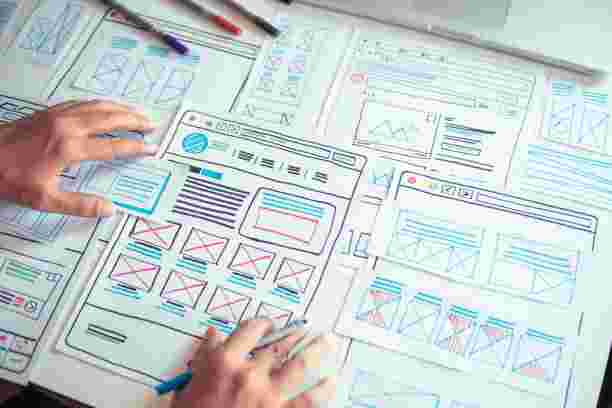
As businesses expand, managing customer relationships, sales activities, and internal workflows becomes increasingly complex. A well-designed CRM system helps companies handle these responsibilities efficiently, but its success depends heavily on usability. Investing in professional crm ui ux design can transform a complicated CRM platform into an intuitive workspace that supports employees, improves productivity, and adapts to business growth.
A CRM system should do more than store customer information. It should make everyday tasks easier, help teams collaborate, and provide quick access to important insights. Here are seven ways professional CRM UI/UX design supports growing businesses.
1. Improves Employee Productivity
As teams grow, employees often need to manage more customers, update records, track sales opportunities, and communicate with different departments. A poorly organized CRM interface can make these activities unnecessarily time-consuming.
Professional CRM UI/UX design focuses on simplifying everyday interactions. Clear navigation, organized dashboards, accessible tools, and logical workflows help employees complete tasks with fewer steps.
For example, sales representatives should be able to access customer profiles, update deal statuses, and review follow-up activities without navigating through multiple unnecessary screens.
When employees spend less time figuring out how the software works, they can focus more on meaningful business activities.
2. Makes CRM Systems Easier to Scale
Business growth often brings new employees, departments, customers, and operational requirements. A CRM interface that works for a small team may become difficult to manage as the organization expands.
Scalable CRM design considers future requirements from the beginning. Flexible layouts, modular components, customizable dashboards, and consistent navigation make it easier to accommodate additional features and users.
A well-planned interface also helps businesses introduce new workflows without completely changing how employees interact with the platform.
This flexibility reduces usability challenges and makes CRM software more valuable as business operations become more advanced.
3. Supports Better Team Collaboration
Growing businesses often depend on collaboration between sales, marketing, customer support, and management teams. If employees cannot easily access relevant information, communication gaps and duplicated work can become common problems.
An effective CRM interface brings important information together in an organized environment. Shared customer records, activity timelines, task assignments, and clear status indicators help employees understand what is happening across different departments.
For example, a customer support representative can review previous interactions before responding to a customer, while a sales manager can check the latest updates on active opportunities.
A user-friendly CRM experience helps teams stay informed and coordinate their work more effectively.
4. Reduces Employee Training Requirements
When a company hires new employees, it needs to help them understand its tools and processes quickly. Complicated CRM software can increase training time and make onboarding more difficult.
Professional UI/UX design makes CRM platforms easier to learn through familiar navigation patterns, clear labels, consistent layouts, and helpful visual guidance.
Simple forms and understandable instructions also reduce confusion when employees enter customer information or complete unfamiliar tasks.
A well-designed CRM system allows new team members to become comfortable with essential features more quickly. This is especially valuable for businesses experiencing frequent hiring or expanding into new departments.
5. Helps Managers Make Better Decisions
Business growth requires informed decisions based on accurate and accessible information. CRM platforms contain valuable data about customer interactions, sales performance, lead generation, and team activities.
However, collecting information is not enough. Employees and managers need an interface that presents data in a meaningful way.
Effective CRM dashboard design uses organized charts, relevant metrics, clear labels, and visual comparisons to make important information easier to understand.
Managers can monitor sales pipeline activity, identify performance changes, and review team progress without searching through large amounts of unstructured data.
Thoughtful data visualization turns CRM information into practical insights that support business planning.
6. Creates a Better Customer Experience
Although CRM software is primarily used by internal teams, its usability can directly influence customer interactions.
When employees can quickly find customer information, understand previous conversations, and track ongoing requests, they can provide more consistent service.
For example, a support team can respond more effectively when customer histories and unresolved issues are easy to access. Similarly, sales representatives can personalize conversations using relevant details stored in the CRM.
A well-organized interface helps reduce delays, minimize mistakes, and maintain continuity across customer interactions.
As a business grows, these improvements become increasingly important because maintaining service quality across a larger customer base can be challenging.
7. Improves Long-Term User Adoption
Even a feature-rich CRM platform cannot deliver its full value if employees avoid using it. Complex navigation, inconsistent layouts, and confusing workflows can discourage regular usage.
Professional CRM UI/UX design places users at the center of the development process. Designers consider employee needs, common tasks, usability challenges, and different levels of technical experience.
Usability testing and user feedback can reveal problems before they affect the entire organization. Businesses can then improve the interface based on how employees actually interact with the system.
An intuitive CRM experience encourages consistent usage, helps maintain accurate records, and supports long-term software adoption.
What Should Growing Businesses Look for in CRM UI/UX Design?
When planning a new CRM platform or improving an existing one, businesses should consider several important design factors:
-
Simple navigation: Employees should find important features without unnecessary steps.
-
Responsive layouts: The interface should work effectively across desktops, tablets, and mobile devices.
-
Consistent design: Reusable components and predictable layouts create a familiar experience.
-
Role-based experiences: Different departments should have access to tools and information relevant to their responsibilities.
-
Accessible interfaces: Readable text, sufficient contrast, and clear interaction states help accommodate different users.
-
Usability testing: Testing with real users helps identify friction points and validate design decisions.
Considering these elements helps businesses build CRM experiences that remain practical as their requirements evolve.
Conclusion
Professional CRM UI/UX design is an important investment for businesses planning sustainable growth. From improving employee productivity and simplifying onboarding to supporting collaboration and better decision-making, an intuitive interface helps organizations get more value from their CRM systems.
The right design approach also makes it easier to accommodate new employees, expanding workflows, and changing customer expectations. Businesses looking to improve their CRM experience can work with Soft-korner to develop user-centered interfaces that support usability, efficiency, and long-term business goals.
Frequently Asked Questions
1. Why is CRM UI/UX design important for growing businesses?
CRM UI/UX design makes software easier to use, improves employee productivity, supports collaboration, and helps businesses manage increasingly complex operations.
2. How does good CRM design improve employee productivity?
It simplifies navigation, reduces unnecessary steps, organizes important information, and makes common tasks easier to complete.
3. Can CRM UI/UX design improve customer satisfaction?
Yes. An intuitive CRM helps employees access customer information quickly, understand previous interactions, and provide more consistent support.
4. What features make a CRM interface scalable?
Flexible layouts, modular components, customizable dashboards, responsive design, and role-based access help CRM platforms accommodate growing business requirements.
5. When should a business consider redesigning its CRM interface?
A redesign may be worthwhile when employees struggle with navigation, avoid using certain features, experience repeated workflow problems, or find that the interface no longer supports business operations effectively.

 Arabic
 French
 Spanish
 Portuguese
 Deutsch
 Turkish
 Dutch
 Italiano
 Russian
 Romaian
 Portuguese (Brazil)
 Greek